

برنامه Spring Boot Full stack Blockchain با Hyperledger Fabric در Kubernetes (قسمت 3)
 توسط مریم گوهرزاد
- مقالات آموزش برنامه نویسی بلاکچین
- آوریل 27, 2025
- 19 دقیقه زمان خواندن
- 753 بازدید
از سری مقالات ادغام Hyperledger Fabric با Spring Boot در این مقاله، به بررسی Fabric CA Server و نصب Fabric CA Server در Kubernetes می پردازیم.
سایر مقالات در مورد ادغام Hyperledger Fabric با Spring Boot از لینک های زیر قابل دسترسی هستند.
بخش 1 – مقدمه
قسمت 2 – راه اندازی خوشه Kubernetes
قسمت 3- Fabric CA Server
بخش 4 – تولید گواهینامه ها و مصنوعات
Fabric CA Server چیست؟
Fabric CA یک مرجع صدور گواهی (CA) برای Hyperledger Fabric است.
امکاناتی مانند:
- ثبت هویت، یا به عنوان رجیستری کاربر به LDAP متصل می شود
- صدور گواهی ثبت نام (ECerts)
- تمدید و ابطال گواهینامه
نمودار زیر نشان می دهد که چگونه سرور Hyperledger Fabric CA در معماری کلی Hyperledger Fabric قرار می گیرد.
پیشنهاد ویژه: دوره برنامه نویسی بلاکچین
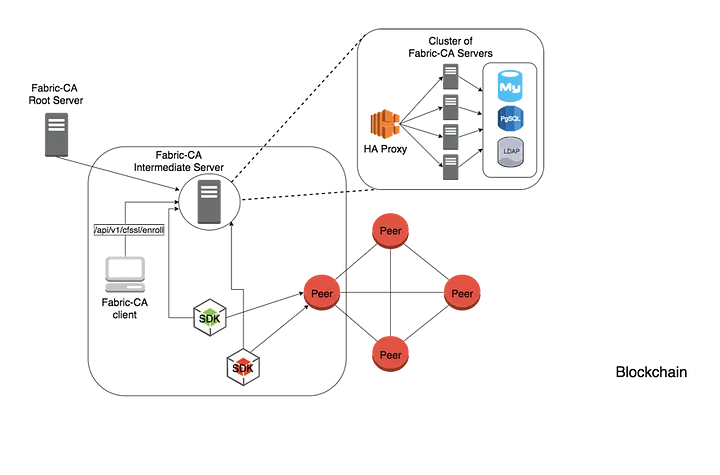
دو راه برای تعامل با سرور Hyperledger Fabric CA وجود دارد: از طریق کلاینت Hyperledger Fabric CA یا از طریق یکی از Fabric SDK. تمام ارتباط با سرور Hyperledger Fabric CA از طریق API های REST است.
کلاینت Hyperledger Fabric CA یا SDK ممکن است به سروری در خوشه ای از سرورهای Hyperledger Fabric CA متصل شود. این در قسمت بالا سمت راست نمودار نشان داده شده است. کلاینت به یک نقطه پایانی پروکسی HA هدایت می شود که بار ترافیک را به یکی از اعضای خوشه فابریک-ca-server متعادل می کند.
یک سرور ممکن است حاوی چندین CA باشد. هر CA یا یک CA ریشه یا یک CA میانی است. هر CA واسطه دارای یک CA والد است که یا یک CA ریشه یا یک CA واسطه دیگر است.
پیکربندی Fabric CA Server
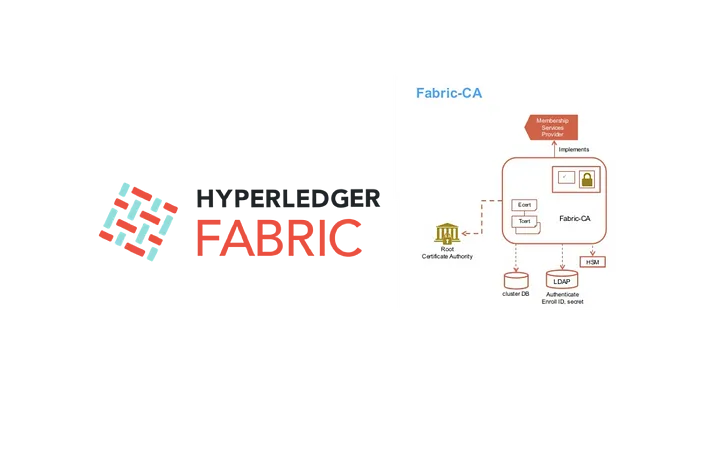
بیایید پروژه ای را که دانلود کردیم از این لینک باز کنیم و به دایرکتوری که ca در آن قرار دارد برویم.
$ cd deploy/k8s
تنظیمات پیکربندی
Fabric CA 3 راه برای پیکربندی تنظیمات روی سرور Fabric CA و کلاینت ارائه می دهد. ترتیب تقدم عبارت است از:
- پرچم های CLI
- متغیرهای محیطی
- فایل پیکربندی
ما سرور فابریک ca را با فایل پیکربندی پیکربندی می کنیم.
ما 4 Fabric CAserver را برای سفارش دهنده، org1، org2 و org3 راه اندازی می کنیم.لازم است برای هر سرور Fabric CA یک فایل پیکربندی تعریف شود.
فایل پیکربندی Fabric CA که در پروژه برای Orderer تعریف شده است به شرح زیر است فایل پیکربندی در پوشه deploy/k8s/fabricfiles/organizations/fabric-ca/ordererOrg قرار دارد.
############################################################################# # This is a configuration file for the fabric-ca-server command. # # COMMAND LINE ARGUMENTS AND ENVIRONMENT VARIABLES # ------------------------------------------------ # Each configuration element can be overridden via command line # arguments or environment variables. The precedence for determining # the value of each element is as follows: # 1) command line argument # Examples: # a) --port 443 # To set the listening port # b) --ca.keyfile ../mykey.pem # To set the keyfile element in the ca section below; # note the '.' separator character. # 2) environment variable # Examples: # a) FABRIC_CA_SERVER_PORT=443 # To set the listening port # b) FABRIC_CA_SERVER_CA_KEYFILE=../mykey.pem # To set the keyfile element in the ca section below; # note the '_' separator character. # 3) configuration file # 4) default value (if there is one) # All default values are shown beside each element below. # # FILE NAME ELEMENTS # ------------------ # The value of all fields whose name ends with file or files are # name or names of other files. # For example, see tls.certfile and tls.clientauth.certfiles. # The value of each of these fields can be a simple filename, a # relative path, or an absolute path. If the value is not an # absolute path, it is interpretted as being relative to the location # of this configuration file. # ############################################################################# # Version of config file version: 1.2.0 # Server's listening port (default: 7054) port: 7054 # Enables debug logging (default: false) debug: false # Size limit of an acceptable CRL in bytes (default: 512000) crlsizelimit: 512000 ############################################################################# # TLS section for the server's listening port # # The following types are supported for client authentication: NoClientCert, # RequestClientCert, RequireAnyClientCert, VerifyClientCertIfGiven, # and RequireAndVerifyClientCert. # # Certfiles is a list of root certificate authorities that the server uses # when verifying client certificates. ############################################################################# tls: # Enable TLS (default: false) enabled: true # TLS for the server's listening port certfile: keyfile: clientauth: type: noclientcert certfiles: ############################################################################# # The CA section contains information related to the Certificate Authority # including the name of the CA, which should be unique for all members # of a blockchain network. It also includes the key and certificate files # used when issuing enrollment certificates (ECerts) and transaction # certificates (TCerts). # The chainfile (if it exists) contains the certificate chain which # should be trusted for this CA, where the 1st in the chain is always the # root CA certificate. ############################################################################# ca: # Name of this CA name: OrdererCA # Key file (is only used to import a private key into BCCSP) keyfile: # Certificate file (default: ca-cert.pem) certfile: # Chain file chainfile: ############################################################################# # The gencrl REST endpoint is used to generate a CRL that contains revoked # certificates. This section contains configuration options that are used # during gencrl request processing. ############################################################################# crl: # Specifies expiration for the generated CRL. The number of hours # specified by this property is added to the UTC time, the resulting time # is used to set the 'Next Update' date of the CRL. expiry: 24h ############################################################################# # The registry section controls how the fabric-ca-server does two things: # 1) authenticates enrollment requests which contain a username and password # (also known as an enrollment ID and secret). # 2) once authenticated, retrieves the identity's attribute names and # values which the fabric-ca-server optionally puts into TCerts # which it issues for transacting on the Hyperledger Fabric blockchain. # These attributes are useful for making access control decisions in # chaincode. # There are two main configuration options: # 1) The fabric-ca-server is the registry. # This is true if ldap.enabled in the ldap section below is false. # 2) An LDAP server is the registry, in which case the fabric-ca-server # calls the LDAP server to perform these tasks. # This is true if ldap.enabled in the ldap section below is true, # which means this registry section is ignored. ############################################################################# registry: # Maximum number of times a password/secret can be reused for enrollment # (default: -1, which means there is no limit) maxenrollments: -1 # Contains identity information which is used when LDAP is disabled identities: - name: admin pass: adminpw type: client affiliation: attrs: hf.Registrar.Roles: * hf.Registrar.DelegateRoles: * hf.Revoker: true hf.IntermediateCA: true hf.GenCRL: true hf.Registrar.Attributes: * hf.AffiliationMgr: true ############################################################################# # Database section # Supported types are: sqlite3, postgres, and mysql. # The datasource value depends on the type. # If the type is sqlite3, the datasource value is a file name to use # as the database store. Since sqlite3 is an embedded database, it # may not be used if you want to run the fabric-ca-server in a cluster. # To run the fabric-ca-server in a cluster, you must choose postgres # or mysql. ############################################################################# db: type: sqlite3 datasource: fabric-ca-server.db tls: enabled: false certfiles: client: certfile: keyfile: ############################################################################# # LDAP section # If LDAP is enabled, the fabric-ca-server calls LDAP to: # 1) authenticate enrollment ID and secret (i.e. username and password) # for enrollment requests; # 2) To retrieve identity attributes ############################################################################# ldap: # Enables or disables the LDAP client (default: false) # If this is set to true, the registry section is ignored. enabled: false # The URL of the LDAP server url: ldap://:@:/ # TLS configuration for the client connection to the LDAP server tls: certfiles: client: certfile: keyfile: # Attribute related configuration for mapping from LDAP entries to Fabric CA attributes attribute: # 'names' is an array of strings containing the LDAP attribute names which are # requested from the LDAP server for an LDAP identity's entry names: ['uid','member'] # The 'converters' section is used to convert an LDAP entry to the value of # a fabric CA attribute. # For example, the following converts an LDAP 'uid' attribute # whose value begins with 'revoker' to a fabric CA attribute # named hf.Revoker with a value of true (because the boolean expression # evaluates to true). # converters: # - name: hf.Revoker # value: attr(uid) =~ revoker* converters: - name: value: # The 'maps' section contains named maps which may be referenced by the 'map' # function in the 'converters' section to map LDAP responses to arbitrary values. # For example, assume a user has an LDAP attribute named 'member' which has multiple # values which are each a distinguished name (i.e. a DN). For simplicity, assume the # values of the 'member' attribute are 'dn1', 'dn2', and 'dn3'. # Further assume the following configuration. # converters: # - name: hf.Registrar.Roles # value: map(attr(member),groups) # maps: # groups: # - name: dn1 # value: peer # - name: dn2 # value: client # The value of the user's 'hf.Registrar.Roles' attribute is then computed to be # peer,client,dn3. This is because the value of 'attr(member)' is # dn1,dn2,dn3, and the call to 'map' with a 2nd argument of # group replaces dn1 with peer and dn2 with client. maps: groups: - name: value: ############################################################################# # Affiliations section. Fabric CA server can be bootstrapped with the # affiliations specified in this section. Affiliations are specified as maps. # For example: # businessunit1: # department1: # - team1 # businessunit2: # - department2 # - department3 # # Affiliations are hierarchical in nature. In the above example, # department1 (used as businessunit1.department1) is the child of businessunit1. # team1 (used as businessunit1.department1.team1) is the child of department1. # department2 (used as businessunit2.department2) and department3 (businessunit2.department3) # are children of businessunit2. # Note: Affiliations are case sensitive except for the non-leaf affiliations # (like businessunit1, department1, businessunit2) that are specified in the configuration file, # which are always stored in lower case. ############################################################################# affiliations: org1: - department1 - department2 org2: - department1 ############################################################################# # Signing section # # The default subsection is used to sign enrollment certificates; # the default expiration (expiry field) is 8760h, which is 1 year in hours. # # The ca profile subsection is used to sign intermediate CA certificates; # the default expiration (expiry field) is 43800h which is 5 years in hours. # Note that isca is true, meaning that it issues a CA certificate. # A maxpathlen of 0 means that the intermediate CA cannot issue other # intermediate CA certificates, though it can still issue end entity certificates. # (See RFC 5280, section 4.2.1.9) # # The tls profile subsection is used to sign TLS certificate requests; # the default expiration (expiry field) is 8760h, which is 1 year in hours. ############################################################################# signing: default: usage: - digital signature expiry: 8760h profiles: ca: usage: - cert sign - crl sign expiry: 43800h caconstraint: isca: true maxpathlen: 0 tls: usage: - signing - key encipherment - server auth - client auth - key agreement expiry: 8760h ########################################################################### # Certificate Signing Request (CSR) section. # This controls the creation of the root CA certificate. # The expiration for the root CA certificate is configured with the # ca.expiry field below, whose default value is 131400h which is # 15 years in hours. # The pathlength field is used to limit CA certificate hierarchy as described # in section 4.2.1.9 of RFC 5280. # Examples: # 1) No pathlength value means no limit is requested. # 2) pathlength == 1 means a limit of 1 is requested which is the default for # a root CA. This means the root CA can issue intermediate CA certificates, # but these intermediate CAs may not in turn issue other CA certificates # though they can still issue end entity certificates. # 3) pathlength == 0 means a limit of 0 is requested; # this is the default for an intermediate CA, which means it can not issue # CA certificates though it can still issue end entity certificates. ########################################################################### csr: cn: ca-org1 names: - C: US ST: New York L: New York O: example.com OU: hosts: - localhost - example.com - ca-orderer ca: expiry: 131400h pathlength: 1 ############################################################################# # BCCSP (BlockChain Crypto Service Provider) section is used to select which # crypto library implementation to use ############################################################################# bccsp: default: SW sw: hash: SHA2 security: 256 filekeystore: # The directory used for the software file-based keystore keystore: msp/keystore ############################################################################# # Multi CA section # # Each Fabric CA server contains one CA by default. This section is used # to configure multiple CAs in a single server. # # 1) --cacount # Automatically generate non-default CAs. The names of these # additional CAs are ca1, ca2, ... caN, where N is # This is particularly useful in a development environment to quickly set up # multiple CAs. Note that, this config option is not applicable to intermediate CA server # i.e., Fabric CA server that is started with intermediate.parentserver.url config # option (-u command line option) # # 2) --cafiles # For each CA config file in the list, generate a separate signing CA. Each CA # config file in this list MAY contain all of the same elements as are found in # the server config file except port, debug, and tls sections. # # Examples: # fabric-ca-server start -b admin:adminpw --cacount 2 # # fabric-ca-server start -b admin:adminpw --cafiles ca/ca1/fabric-ca-server-config.yaml # --cafiles ca/ca2/fabric-ca-server-config.yaml # ############################################################################# cacount: cafiles: ############################################################################# # Intermediate CA section # # The relationship between servers and CAs is as follows: # 1) A single server process may contain or function as one or more CAs. # This is configured by the Multi CA section above. # 2) Each CA is either a root CA or an intermediate CA. # 3) Each intermediate CA has a parent CA which is either a root CA or another intermediate CA. # # This section pertains to configuration of #2 and #3. # If the intermediate.parentserver.url property is set, # then this is an intermediate CA with the specified parent # CA. # # parentserver section # url - The URL of the parent server # caname - Name of the CA to enroll within the server # # enrollment section used to enroll intermediate CA with parent CA # profile - Name of the signing profile to use in issuing the certificate # label - Label to use in HSM operations # # tls section for secure socket connection # certfiles - PEM-encoded list of trusted root certificate files # client: # certfile - PEM-encoded certificate file for when client authentication # is enabled on server # keyfile - PEM-encoded key file for when client authentication # is enabled on server ############################################################################# intermediate: parentserver: url: caname: enrollment: hosts: profile: label: tls: certfiles: client: certfile: keyfile:csr: ... hosts: - localhost - example.com - ca-orderer
localhost،example.com،ca-orderer به عنوان میزبان csr به فایل پیکربندی اضافه شد.
ca-orderer نام سرویس فابریک سرور ca در kubernetes است.
ca: # Name of this CA name: OrdererCA
OrdererCA نام CA است.
csr: cn: ca-org1 names: - C: US ST: New York L: New York O: ca-org1 OU: ca-org1
تمام فیلدهای بالا مربوط به کلید امضای X.509 و گواهی است که توسط فابریک-ca-server init تولید می شود. این مربوط به فایلهای ca.certfile و ca.keyfile در فایل پیکربندی سرور است. فیلدها به شرح زیر است:
cn نام مشترک است
O نام سازمان است
OU واحد سازمانی است
L مکان یا شهر است
ST ایالت است
C کشور است
registry: ... identities: - name: admin pass: adminpw type: client affiliation:
باید با حداقل یک هویت بوت استرپ از پیش ثبت شده پیکربندی شود تا شما را قادر سازد تا هویت های دیگر را ثبت کنید.گزینه -b نام و رمز عبور هویت بوت استرپ را مشخص می کند.
db: type: sqlite3 datasource: fabric-ca-server.db
پایگاه داده پیش فرض SQLite است و فایل پایگاه داده پیش فرض پارچه-ca-server.db در فهرست اصلی سرور Fabric CA است. سرور Fabric CA همچنین می تواند به پایگاه داده PostgreSQL یا MySQL متصل شود.
Fabric CA از نسخه های پایگاه داده زیر در راه اندازی کلاستر پشتیبانی می کند:
PostgreSQL: 9.5.5 یا بالاتر
MySQL: 5.7 یا بالاتر
affiliations: org1: - department1 - department2 org2: - department1
من به وابستگی ها به عنوان برچسب های سلسله مراتبی فکر می کنم. هر هویت را می توان به یک وابستگی در سلسله مراتب برچسب (وابسته) کرد. وقتی هویتی با یک وابستگی مرتبط است، به آن و همه وابستگی های فرزند وابسته است. وابستگی ها در حال حاضر در هنگام ثبت نام و ابطال استفاده می شوند.
فایل پیکربندی Fabric CA که در پروژه برای Org1 تعریف شده است به صورت زیر است فایل پیکربندی در پوشه deploy/k8s/fabricfiles/organizations/fabric-ca/org1 قرار دارد.
############################################################################# # This is a configuration file for the fabric-ca-server command. # # COMMAND LINE ARGUMENTS AND ENVIRONMENT VARIABLES # ------------------------------------------------ # Each configuration element can be overridden via command line # arguments or environment variables. The precedence for determining # the value of each element is as follows: # 1) command line argument # Examples: # a) --port 443 # To set the listening port # b) --ca.keyfile ../mykey.pem # To set the keyfile element in the ca section below; # note the '.' separator character. # 2) environment variable # Examples: # a) FABRIC_CA_SERVER_PORT=443 # To set the listening port # b) FABRIC_CA_SERVER_CA_KEYFILE=../mykey.pem # To set the keyfile element in the ca section below; # note the '_' separator character. # 3) configuration file # 4) default value (if there is one) # All default values are shown beside each element below. # # FILE NAME ELEMENTS # ------------------ # The value of all fields whose name ends with file or files are # name or names of other files. # For example, see tls.certfile and tls.clientauth.certfiles. # The value of each of these fields can be a simple filename, a # relative path, or an absolute path. If the value is not an # absolute path, it is interpretted as being relative to the location # of this configuration file. # ############################################################################# # Version of config file version: 1.2.0 # Server's listening port (default: 7054) port: 7054 # Enables debug logging (default: false) debug: false # Size limit of an acceptable CRL in bytes (default: 512000) crlsizelimit: 512000 ############################################################################# # TLS section for the server's listening port # # The following types are supported for client authentication: NoClientCert, # RequestClientCert, RequireAnyClientCert, VerifyClientCertIfGiven, # and RequireAndVerifyClientCert. # # Certfiles is a list of root certificate authorities that the server uses # when verifying client certificates. ############################################################################# tls: # Enable TLS (default: false) enabled: true # TLS for the server's listening port certfile: keyfile: clientauth: type: noclientcert certfiles: ############################################################################# # The CA section contains information related to the Certificate Authority # including the name of the CA, which should be unique for all members # of a blockchain network. It also includes the key and certificate files # used when issuing enrollment certificates (ECerts) and transaction # certificates (TCerts). # The chainfile (if it exists) contains the certificate chain which # should be trusted for this CA, where the 1st in the chain is always the # root CA certificate. ############################################################################# ca: # Name of this CA name: Org1CA # Key file (is only used to import a private key into BCCSP) keyfile: # Certificate file (default: ca-cert.pem) certfile: # Chain file chainfile: ############################################################################# # The gencrl REST endpoint is used to generate a CRL that contains revoked # certificates. This section contains configuration options that are used # during gencrl request processing. ############################################################################# crl: # Specifies expiration for the generated CRL. The number of hours # specified by this property is added to the UTC time, the resulting time # is used to set the 'Next Update' date of the CRL. expiry: 24h ############################################################################# # The registry section controls how the fabric-ca-server does two things: # 1) authenticates enrollment requests which contain a username and password # (also known as an enrollment ID and secret). # 2) once authenticated, retrieves the identity's attribute names and # values which the fabric-ca-server optionally puts into TCerts # which it issues for transacting on the Hyperledger Fabric blockchain. # These attributes are useful for making access control decisions in # chaincode. # There are two main configuration options: # 1) The fabric-ca-server is the registry. # This is true if ldap.enabled in the ldap section below is false. # 2) An LDAP server is the registry, in which case the fabric-ca-server # calls the LDAP server to perform these tasks. # This is true if ldap.enabled in the ldap section below is true, # which means this registry section is ignored. ############################################################################# registry: # Maximum number of times a password/secret can be reused for enrollment # (default: -1, which means there is no limit) maxenrollments: -1 # Contains identity information which is used when LDAP is disabled identities: - name: admin pass: adminpw type: client affiliation: attrs: hf.Registrar.Roles: * hf.Registrar.DelegateRoles: * hf.Revoker: true hf.IntermediateCA: true hf.GenCRL: true hf.Registrar.Attributes: * hf.AffiliationMgr: true ############################################################################# # Database section # Supported types are: sqlite3, postgres, and mysql. # The datasource value depends on the type. # If the type is sqlite3, the datasource value is a file name to use # as the database store. Since sqlite3 is an embedded database, it # may not be used if you want to run the fabric-ca-server in a cluster. # To run the fabric-ca-server in a cluster, you must choose postgres # or mysql. ############################################################################# db: type: sqlite3 datasource: fabric-ca-server.db tls: enabled: false certfiles: client: certfile: keyfile: ############################################################################# # LDAP section # If LDAP is enabled, the fabric-ca-server calls LDAP to: # 1) authenticate enrollment ID and secret (i.e. username and password) # for enrollment requests; # 2) To retrieve identity attributes ############################################################################# ldap: # Enables or disables the LDAP client (default: false) # If this is set to true, the registry section is ignored. enabled: false # The URL of the LDAP server url: ldap://:@:/ # TLS configuration for the client connection to the LDAP server tls: certfiles: client: certfile: keyfile: # Attribute related configuration for mapping from LDAP entries to Fabric CA attributes attribute: # 'names' is an array of strings containing the LDAP attribute names which are # requested from the LDAP server for an LDAP identity's entry names: ['uid','member'] # The 'converters' section is used to convert an LDAP entry to the value of # a fabric CA attribute. # For example, the following converts an LDAP 'uid' attribute # whose value begins with 'revoker' to a fabric CA attribute # named hf.Revoker with a value of true (because the boolean expression # evaluates to true). # converters: # - name: hf.Revoker # value: attr(uid) =~ revoker* converters: - name: value: # The 'maps' section contains named maps which may be referenced by the 'map' # function in the 'converters' section to map LDAP responses to arbitrary values. # For example, assume a user has an LDAP attribute named 'member' which has multiple # values which are each a distinguished name (i.e. a DN). For simplicity, assume the # values of the 'member' attribute are 'dn1', 'dn2', and 'dn3'. # Further assume the following configuration. # converters: # - name: hf.Registrar.Roles # value: map(attr(member),groups) # maps: # groups: # - name: dn1 # value: peer # - name: dn2 # value: client # The value of the user's 'hf.Registrar.Roles' attribute is then computed to be # peer,client,dn3. This is because the value of 'attr(member)' is # dn1,dn2,dn3, and the call to 'map' with a 2nd argument of # group replaces dn1 with peer and dn2 with client. maps: groups: - name: value: ############################################################################# # Affiliations section. Fabric CA server can be bootstrapped with the # affiliations specified in this section. Affiliations are specified as maps. # For example: # businessunit1: # department1: # - team1 # businessunit2: # - department2 # - department3 # # Affiliations are hierarchical in nature. In the above example, # department1 (used as businessunit1.department1) is the child of businessunit1. # team1 (used as businessunit1.department1.team1) is the child of department1. # department2 (used as businessunit2.department2) and department3 (businessunit2.department3) # are children of businessunit2. # Note: Affiliations are case sensitive except for the non-leaf affiliations # (like businessunit1, department1, businessunit2) that are specified in the configuration file, # which are always stored in lower case. ############################################################################# affiliations: org1: - department1 - department2 org2: - department1 org3: - department1 ############################################################################# # Signing section # # The default subsection is used to sign enrollment certificates; # the default expiration (expiry field) is 8760h, which is 1 year in hours. # # The ca profile subsection is used to sign intermediate CA certificates; # the default expiration (expiry field) is 43800h which is 5 years in hours. # Note that isca is true, meaning that it issues a CA certificate. # A maxpathlen of 0 means that the intermediate CA cannot issue other # intermediate CA certificates, though it can still issue end entity certificates. # (See RFC 5280, section 4.2.1.9) # # The tls profile subsection is used to sign TLS certificate requests; # the default expiration (expiry field) is 8760h, which is 1 year in hours. ############################################################################# signing: default: usage: - digital signature expiry: 8760h profiles: ca: usage: - cert sign - crl sign expiry: 43800h caconstraint: isca: true maxpathlen: 0 tls: usage: - signing - key encipherment - server auth - client auth - key agreement expiry: 8760h ########################################################################### # Certificate Signing Request (CSR) section. # This controls the creation of the root CA certificate. # The expiration for the root CA certificate is configured with the # ca.expiry field below, whose default value is 131400h which is # 15 years in hours. # The pathlength field is used to limit CA certificate hierarchy as described # in section 4.2.1.9 of RFC 5280. # Examples: # 1) No pathlength value means no limit is requested. # 2) pathlength == 1 means a limit of 1 is requested which is the default for # a root CA. This means the root CA can issue intermediate CA certificates, # but these intermediate CAs may not in turn issue other CA certificates # though they can still issue end entity certificates. # 3) pathlength == 0 means a limit of 0 is requested; # this is the default for an intermediate CA, which means it can not issue # CA certificates though it can still issue end entity certificates. ########################################################################### csr: cn: ca-org1 names: - C: US ST: New York L: New York O: ca-org1 OU: ca-org1 hosts: - localhost - example.com - ca-org1 ca: expiry: 131400h pathlength: 1 ############################################################################# # BCCSP (BlockChain Crypto Service Provider) section is used to select which # crypto library implementation to use ############################################################################# bccsp: default: SW sw: hash: SHA2 security: 256 filekeystore: # The directory used for the software file-based keystore keystore: msp/keystore ############################################################################# # Multi CA section # # Each Fabric CA server contains one CA by default. This section is used # to configure multiple CAs in a single server. # # 1) --cacount # Automatically generate non-default CAs. The names of these # additional CAs are
مریم گوهرزاد
مدرس و بنیانگذار هلدینگ آرتا رسانه. برنامه نویس و محقق حوزه بلاکچین


